Golem CLI Environments and Profiles
There are two main ways to interact with Golem CLI in a context:
- using it in a directory that defines a Golem Application and its Environments with the Application Manifest
- or using it without a manifest, relying on profiles and CLI flags
which will specify the target server and environment to use.
If a CLI command involves connecting to a server it will always log the current selection of application, environment, server and / or profile.
$ golem deploy --cloud
Selected app: myapp, env: cloud, server: cloud - builtin (https://release.api.golem.cloud)
Using Application Environments with Application Manifest
The Application Manifest defines the Application Name with the app property, and multiple Environments
can be defined in the environments property.
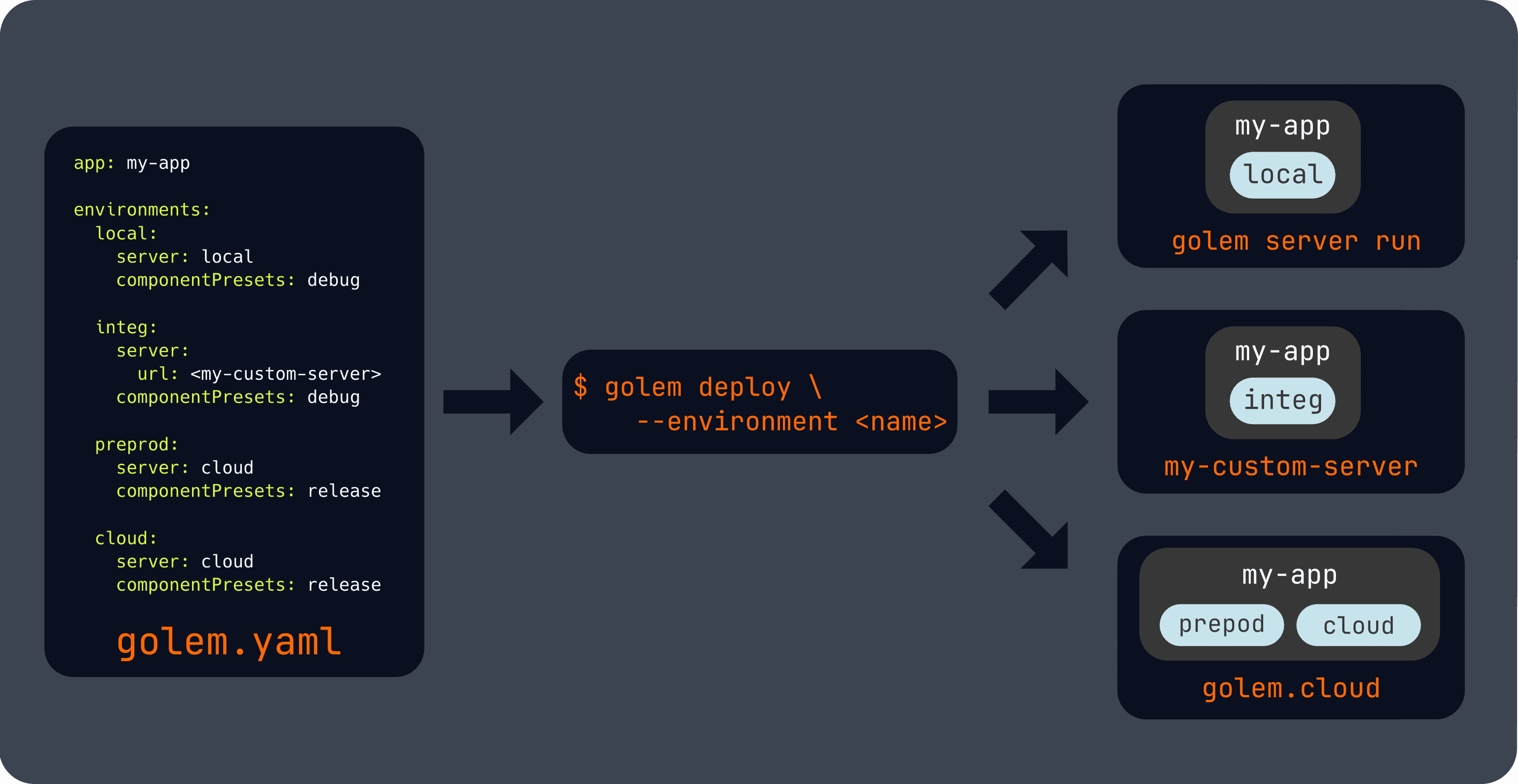
Our template will include the built-in local and cloud environments. The local one is configured to be used
with golem server run, while the cloud one is configured to be used with Golem Cloud.
Custom environments with custom target servers can also be defined, see the reference for more information.
In this mode the following global flags and environment variable can be used to select the target environment:
# Explicitly selecting an environment by name
golem --environment <ENVIRONMENT_NAME>
golem -E <ENVIRONMENT_NAME>

# Using the convenience cloud and local flags:
golem --local
golem -L
golem --cloud
golem -C

# Or by using environment variables, which can be useful in CI/CD pipelines:
export GOLEM_ENVIRONMENT=<ENVIRONMENT_NAME>
Profiles
The Golem CLI can also be used without an Application Manifest, which is useful for operational and automation workflows.
The CLI has built-in profiles for accessing the local and cloud servers, and without a manifest, the --local and
--cloud flags select these profiles.
An unqualified environment name selects an environment from the discovered application manifest:
golem --environment production component listDo not combine an unqualified --environment with --local or --cloud.
Qualified references identify a remote application environment, while the profile selects the server used to reach it:
golem --profile cloud --environment myapp/production component list
golem --profile cloud --environment owner@example.com/myapp/production component list
The accepted forms are APPLICATION/ENVIRONMENT and ACCOUNT_EMAIL/APPLICATION/ENVIRONMENT. Select the profile explicitly when the default profile does not point at the intended server.
Logging in to Golem Cloud
Golem Cloud requires authentication to access our cloud servers. This happens automatically the first time you run any command that requires authentication, but if you want to trigger authentication, the following command can be used:
golem --disable-app-manifest-discovery --profile cloud account getThis selects the built-in Cloud profile without manifest discovery. It starts browser authentication when needed and reuses valid cached credentials otherwise. An already selected Cloud profile does not require another selection flag.
Profile management
The golem profile subcommands can be used to
- create custom profiles, optionally with an interactive wizard
- switch the default profile
- get the current and list all available profiles
See the builtin CLI help for more information:
$ golem profile
Manage global CLI profiles

Usage: golem profile [OPTIONS] <COMMAND>

Commands:
  new     Create a new global profile, call without <NAME> for interactive setup
  list    List global profiles
  switch  Set the active global default profile
  get     Show global profile details
  delete  Remove global profile
  config  Configure global profile
  help    Print this message or the help of the given subcommand(s)