Golem CLI Environments and Profiles
There are two main ways to interact with Golem CLI in a context:
- using it in a directory that defines a Golem Application along with its Environments using the Application Manifest (also see the )
- or using it without a manifest, relying on profiles and CLI flags
which will specify the target server and environment to use.
If a CLI command involves connecting to a server it will always log the current selection of application, environment, server and / or profile.
$ golem deploy --cloud
Selected app: myapp, env: cloud, server: cloud - builtin (https://release.api.golem.cloud)
Using Application Environments with Application Manifest
The Application Manifest defines the Application Name with the app property, and multiple Environments
can be defined in the environments property.
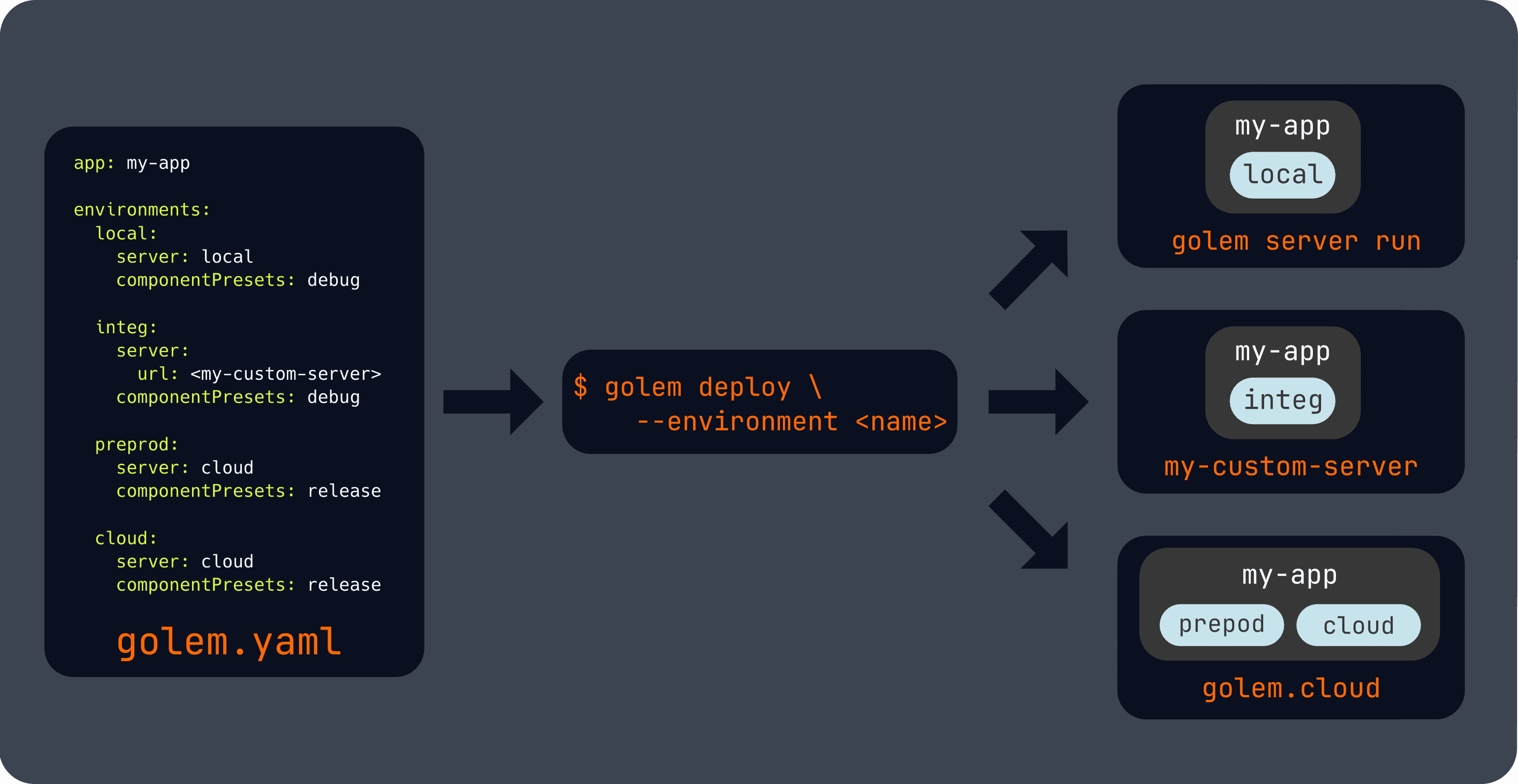
Our template will include the built-in local and cloud environments. The local one is configured to be used
wuth golem server run, while the cloud one is configured to be used with Golem Cloud.
Custom environments with custom target servers can also be defined, see the reference for more information.
In this mode the following global flags and environment variable can be used to select the target environment:
# Explicitly selecting an environment by name
golem --enviroment <ENVIRONMENT_NAME>
golem -E <ENVIRONMENT_NAME>

# Using the convenience cloud and local flags:
golem --local
golem -L
golem --cloud
golem -C

# Or by using environment variables, which can be useful in CI/CD pipelines:
export GOLEM_ENVIRONMENT=<ENVIRONMENT_NAME>
Profiles
The Golem CLI can also be used without an Application Manifest, which is useful for supporting dev-ops use cases.
The CLI has built-in profiles for accessing the local and cloud servers, and without a manifest, the -local and
-cloud flags will select these profiles.
For commands that also require and Application Environment the longer forms of the --environment flag can be used.
Note that the CLI will tell you, if such an environment reference is needed, and about the possible accepted formats, e.g.:
$ golem component list
Selected app: -, env: -, server: http://localhost:9881/, profile: local
error: The requested command requires an environment from an application manifest or via flags or environment variables.

Accepted environment and profile flags and environment variables:

  --environment <ENVIRONMENT_NAME>, -E <ENVIRONMENT_NAME>:
    Selects an environment from the current application manifest.
    The application is searched based on the current directory.

    If no explicit flags or environment variables are used then the default environment
    is selected from the manifest.

    If there is no available application, then a more specific from has to be used.


  --environment <APPLICATION_NAME>/<ENVIRONMENT_NAME>, -E <APPLICATION_NAME>/<ENVIRONMENT_NAME>:
    Selects a server environment from a specific application. The used server is the
    current selected manifest environment or the selected profile if the CLI is used
    without a manifest.


  --environment <ACCOUNT_EMAIL>/<APPLICATION_NAME>/<ENVIRONMENT_NAME>, -E <ACCOUNT_EMAIL>/<APPLICATION_NAME>/<ENVIRONMENT_NAME>:
    Selects a server environment from a specific application owned by another account.
    The used server is the current selected manifest environment or the selected profile
    if the CLI is used without a manifest.


  --local, -L:
    When used with an application manifest then the environment is selected from the
    manifest. Without it it selects the built-in local profile.


  --cloud, -C:
    When used with an application manifest then the environment is selected from the
    manifest. Without it it selects the built-in cloud profile.


  --profile:
    Selects a different profile then the default one. Only effective when used without
    an application manifest.


  GOLEM_ENVIRONMENT environment variable:
    Alternative to the --environment flag.


  GOLEM_PROFILE environment variable:
    Alternative to the --profile flag.
Logging in to Golem Cloud
Golem Cloud requires authentication to access our cloud servers. This happens automatically the first time you run any command that requires authentication, but if you want to trigger authentication, the following command can be used:
golem cloud account get --cloudNote that the --cloud is required to make sure that the authentication happens against the Golem Cloud servers.
Profile management
The golem profile subcommands can be used to
- create custom profiles, optionally with an interactive wizard
- switch the default profile
- get the current and list all available profiles
See the builtin CLI help for more information:
$ golem profile
Manage global CLI profiles

Usage: golem profile [OPTIONS] <COMMAND>

Commands:
  new     Create a new global profile, call without <PROFILE_NAME> for interactive setup
  list    List global profiles
  switch  Set the active global default profile
  get     Show global profile details
  delete  Remove global profile
  config  Configure global profile
  help    Print this message or the help of the given subcommand(s)